
Hero - Registration
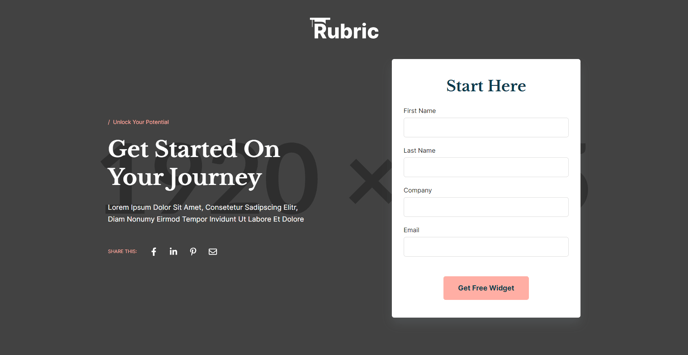
A hero section with social share and a form.
**
View a live demo of this section here.**
The following is a detailed listing of the styling edits made to the section, the modules used in the section, and field changes from the modules’ default state.
Section Styles
Alignment and spacing > Padding
Top: 150
Alignment and spacing > Vertical alignment
Middle
Modules
Section Options
Overlay
Overlay > Color
#000000
Overlay > Opacity
60
Visible Elements
Eyebrow, Heading, Body Text
Semantic Heading Level
1
Style Heading Level
1
Styles > Dark Mode
true
Styles > Module > Max Width
520
Type
Share
Styles > Dark Mode
true
Styles > Module > Spacing > Desktop > Padding
Top: theme.global.spacing.rows * 2
Styles > Icons > Enclose
false
Type
Form
Form Layout > Button Position
center
Advanced > Identifier
registration-form
Styles > Module > Background
Color: theme.global.colors.backgrounds.base
Styles > Module > Borders
Radius: theme.global.borders.radius
Styles > Module > Box Shadow
Color: theme.global.box_shadows.color
Offset X: theme.global.box_shadows.offset_x
Offset Y: theme.global.box_shadows.offset_y
Blur: theme.global.box_shadows.blur
Spread: theme.global.box_shadows.spread
Styles > Module > Spacing > Desktop > Padding
Top: 45
Right: 30
Bottom: 45
Left: 30
Styles > Form > Heading > Alignment
Desktop: center
How to Use This Section
The Hero - Registration section is designed to maximize conversion rates on event registration, course enrollment, and resource download pages. This pre-built section combines a compelling visual backdrop with essential elements to drive user action: clear messaging, social proof through sharing buttons, and a prominently displayed registration form.
When you add this section to your page through the HubSpot page editor, you’ll find it works particularly well as the opening section on landing pages, event detail pages, and program registration pages. The dark overlay and centered content create strong visual hierarchy, ensuring your registration form remains the focal point regardless of your background image choice.
Customization Best Practices
To optimize this section for your specific use case, start by selecting a high-quality background image that relates to your event or program. The 60% black overlay ensures text readability while maintaining visual appeal. You can adjust the overlay opacity in the Section Settings if your background image requires different contrast levels.
The Text Block module supports an eyebrow, heading, and body text configuration that works well for event titles, dates, and brief descriptions. Keep your heading concise but compelling – this is often the first text visitors will read. The 520px max width prevents text from becoming difficult to read on larger screens.
Form Integration Tips
The integrated form uses your existing HubSpot forms, making lead capture seamless. Position the form button centrally to maintain the section’s balanced design. The form’s white background with subtle shadow creates clear separation from the hero background, improving form completion rates.
Consider enabling the social share functionality to amplify your event’s reach. The share buttons integrate with major social platforms and inherit your theme’s styling automatically.