
Multi-Step Form
Hold focus on a long multi-step form for registrations, conversational conversions, feedback, etc.
Hidden Modules
-
Heading
Landing
Landing Header
Version 2
Header Transparent
false
Section 1
Section Styles
Alignment and spacing > Padding
Top: theme.global.spacing.sections / 2
Bottom: theme.global.spacing.sections / 2
Modules
Media
Media Type
Form
Form Layout > Multistep
true
Styles > Module > Max Width
600
Styles > Module > Alignment
Desktop: Center
How to Use This Template
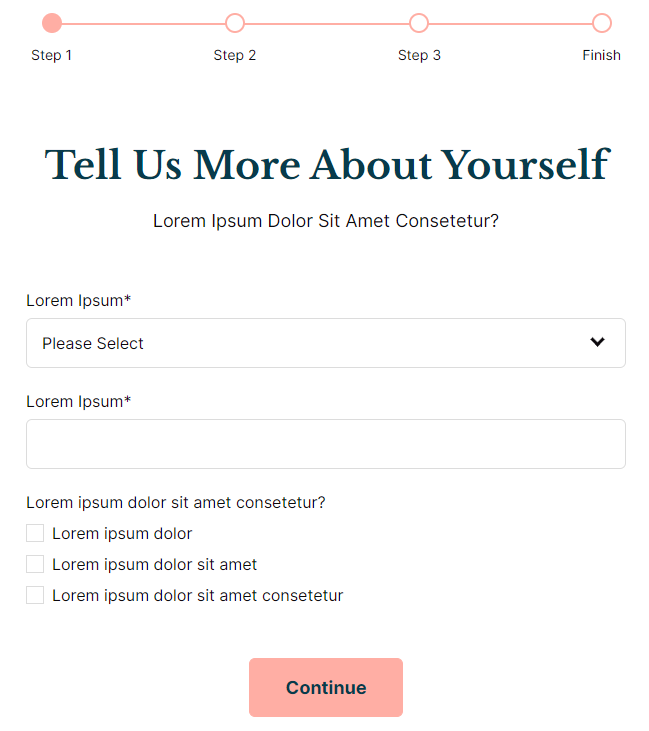
The Multi-Step Form template is specifically designed for educational institutions and organizations that need to collect extensive information without overwhelming users. Unlike standard single-page forms that can intimidate visitors with long lists of fields, this template breaks complex data collection into digestible steps, significantly improving completion rates for admissions applications, event registrations, and detailed feedback surveys.
When you create a new page using this template in the HubSpot page editor, you’ll find the form module pre-configured with multistep functionality enabled. The form’s 600-pixel max width and center alignment ensure optimal readability across devices while maintaining focus on the conversion process. This contained layout prevents distractions and guides users naturally through each step of your form.
Setting up your multistep form is straightforward through the drag-and-drop editor. Navigate to the form module settings and configure your form fields within HubSpot’s form builder, organizing them into logical steps such as personal information, academic history, and preferences. The Rubric theme’s styling automatically applies consistent spacing and typography that matches your site’s design.
Best practices for this template include keeping each step to 3-5 fields maximum and using descriptive step labels that indicate progress. Consider implementing this template for scholarship applications, program enrollment, detailed contact forms, or multi-stage feedback collection where abandonment rates are typically high.
The template works seamlessly with HubSpot’s native form analytics, allowing you to track completion rates for each step and identify potential drop-off points. You can customize the section padding through the theme’s global spacing variables to match your site’s visual hierarchy while maintaining the focused, distraction-free environment essential for form completion.