
Style Guide
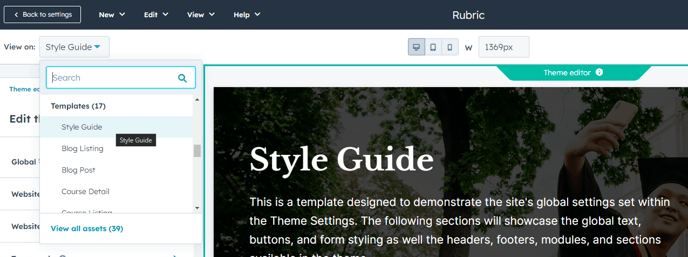
A template designed to demonstrate the site's global settings set within the Theme Settings. This template should NOT be used for creating a page.
This template showcases the global text, buttons, and form styling as well the headers, footers, modules, and sections available in the theme. We recommended setting this template as your preview when adjusting your Theme Settings.
How to Use This Template
The Style Guide template serves as your visual testing ground when customizing the Rubric theme’s appearance through HubSpot’s Theme Settings panel. Rather than making styling changes blindly, you can use this template to see real-time previews of how your adjustments affect typography, color schemes, button designs, and form elements across your entire site.
Setting Up Your Style Guide Preview
To maximize the template’s usefulness, navigate to Design Manager and set the Style Guide template as your preview template before opening Theme Settings. This allows you to see immediate visual feedback as you adjust global styling options like primary colors, font families, button styles, and spacing values.
What You’ll See Demonstrated
The template displays comprehensive examples of every styled element in the Rubric theme, including heading hierarchies (H1-H6), body text variations, call-to-action buttons in different states, form field styling, and color palette applications. You’ll also see how your chosen header and footer configurations appear alongside the theme’s available modules and sections in their default styling.
Best Practices for Theme Customization
Use this template during your initial theme setup phase rather than testing changes on live pages. The organized layout makes it easy to spot inconsistencies in your styling choices and ensures your global settings create a cohesive visual experience. Pay particular attention to contrast ratios and readability when adjusting colors, especially for educational content where accessibility is crucial.
Remember that this template is purely for demonstration purposes—avoid publishing it as an actual page on your site, as it’s designed for internal styling reference rather than visitor consumption.