
What Are Global Partials?
Global Partials are content, that when edited, will update across all pages they are used in.
In Rubric, these partials are used for headers, footers, system content, and blog post content. To access a global partial you first need to have created a page, post, or blog listing using a template from the theme (or child theme if you’re using one) that includes the partial you want to edit.
Further Learning: Read the following HubSpot articles to learn more about creating content: Create and Customize Pages , Create a New Blog, Edit Blog Listing Pages,
Once inside a page, post, or listing global partials will be highlighted in orange when hovered over in the page editor.

You can also easily see all the global partials on the page by opening the Content listing in the left-hand sidebar. The globals will be listed with a circular icon to the right of the partial name.
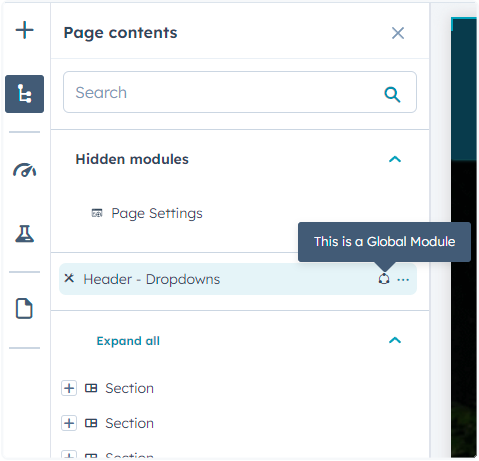
Clicking on a partial within the page editor or within the Content listing will pop up a dialog with the button Open in global content editor. Clicking this button will redirect you to the editor for the global partial you’ve clicked on.

Best Practices for Managing Global Partials
Global partials are particularly powerful in the Rubric theme because they maintain consistency across your educational institution or resource-heavy website while streamlining your content management workflow. When you edit a global partial, changes propagate automatically to every page where that partial appears, making site-wide updates efficient and error-free.
Strategic Implementation Tips
Consider which content elements benefit most from global treatment. Navigation menus, contact information, accreditation badges, and recurring calls-to-action are ideal candidates for global partials in educational settings. For event-focused sites, global partials work well for sponsor logos, venue information, and registration buttons that appear across multiple event pages.
Content Editor Workflow
Before making changes to any global partial, preview how modifications will affect different page types in your site. Since Rubric templates include varied layouts for landing pages, blog posts, and resource listings, a global header partial might display differently across these contexts. Use HubSpot’s preview functionality to check responsive behavior on mobile devices, as global partials in headers and footers are particularly visible on smaller screens.
Template Integration Considerations
When working with child themes or customized versions of Rubric, global partials maintain their functionality but may require additional styling adjustments. The theme’s structured approach means that global partials are designed to work seamlessly with the drag-and-drop page editor, allowing you to modify surrounding content modules without affecting the global elements. This separation ensures that your site-wide branding and navigation remain consistent while individual pages retain their unique content and layout flexibility.