
What Are Hidden Modules?
Hidden modules are modules added statically to a template and are not available to be added to a page through drag-and-drop.
These modules are usually for rendering content that affects the template as a whole or requires being used on a specific type of template. You can find these modules by opening the Contents sidebar in the page editor and looking under the Hidden Modules section.
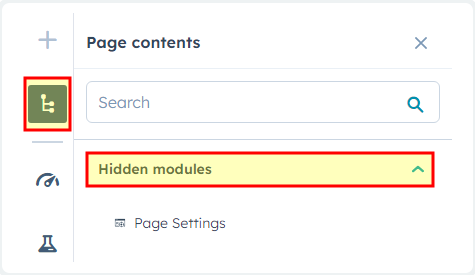
Understanding Hidden Modules in Your Rubric Theme
Hidden modules serve a crucial role in maintaining your site’s structural integrity and performance. Unlike the flexible modules you can drag and drop onto pages, hidden modules are hardcoded into specific templates to ensure essential functionality remains consistent across your educational or resource-heavy site.
When you encounter hidden modules, they typically control elements like navigation bars, footer content, breadcrumb systems, or site-wide announcement banners. These components need to appear on every page of a particular template type without giving content editors the ability to accidentally remove or misplace them. For instance, your course catalog pages might include a hidden module for consistent program filtering, while event pages could have hidden modules for registration tracking.
To modify hidden module content, you’ll need to locate the specific module within the Hidden Modules section of your page editor’s Contents sidebar. While you can’t move these modules around like standard drag-and-drop components, you can still edit their content, styling options, and field values through the module editor. This allows you to customize messaging, update contact information, or adjust visual elements while maintaining the module’s fixed position.
Consider hidden modules as your theme’s backbone – they’re intentionally protected from accidental modification while still offering the customization flexibility your institution needs. When planning your page layouts, factor in the space and functionality these hidden modules provide. If you notice gaps in your page layout or unexpected spacing, check if hidden modules are reserving that area for important structural elements that enhance your visitors’ navigation experience.