
Hero - Landing
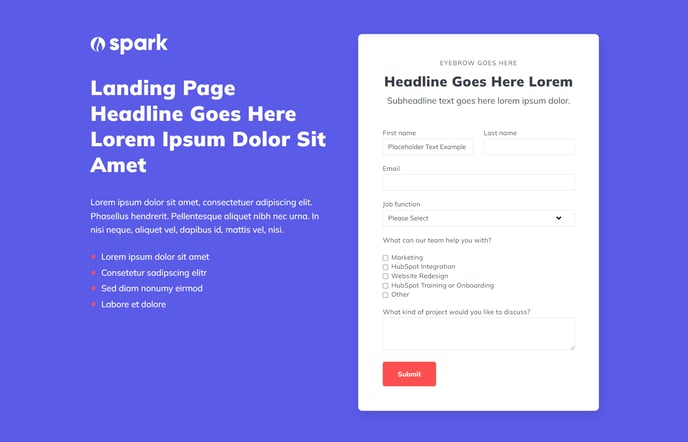
Two column hero for a landing page with logo, text, and form.
View a live demo of this section.
Modules:
- HubSpot Logo
- Theme Rich Text
- Theme Form
Usage Guide
The Hero - Landing section is designed specifically for high-converting landing pages where lead capture is your primary goal. This two-column layout strategically positions your form alongside compelling copy and branding, creating an above-the-fold experience that immediately communicates value to visitors.
When to use this section: Choose Hero - Landing for campaign-specific pages, product demos, webinar registrations, or any page where form completion is the main conversion objective. The balanced two-column design works particularly well when you have substantial copy that needs to establish credibility before asking for visitor information.
To add this section to your page, navigate to the HubSpot page editor and click the plus icon between existing sections. Search for “Hero - Landing” in the sections library and drag it into position. The section will automatically populate with placeholder content that you can customize through the sidebar editor.
Customization tips: The HubSpot Logo module can be swapped for any image if you need to feature partner logos or product shots instead. Use the Theme Rich Text module to craft compelling headlines and benefit-focused copy—this content directly impacts conversion rates, so focus on clear value propositions rather than lengthy descriptions.
The integrated Theme Form module connects directly to your HubSpot forms, enabling automatic lead scoring and workflow triggers. Position your most essential form fields first, as the two-column layout provides limited vertical space before the fold.
Design considerations: This section works best on desktop and tablet devices where the two-column layout has room to breathe. The responsive design will stack elements vertically on mobile, so ensure your headline remains compelling even when separated from the form visually.