
Hero - Simple with Bottom Image
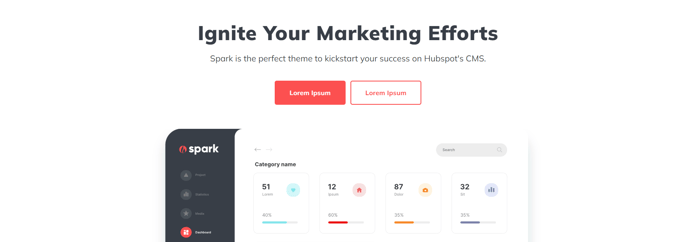
A simple full width text banner with a background color and flush image on the bottom.
View a live demo of this section.
Modules:
- Theme Rich Text
- HubSpot Linked Image
Usage Guide
The Hero - Simple with Bottom Image section creates an impactful full-width banner that’s perfect for homepage headers or landing page introductions where you want to combine compelling copy with striking visual elements. Unlike traditional hero sections that place images as backgrounds, this section positions your image at the bottom of the colored banner area, creating a unique layered effect that draws the eye downward naturally.
When adding this section through the HubSpot page editor’s drag-and-drop interface, you’ll find it works exceptionally well for product launches, service overviews, or any content where you need substantial text space above a supporting image. The flush bottom positioning means your image will extend to the edges without padding, creating a seamless visual flow into the next section of your page.
Customization Options:
The Theme Rich Text module gives you complete control over your headline, subtext, and any call-to-action buttons. You can adjust typography, colors, and spacing directly in the page editor without touching code. The background color can be customized to match your brand palette through the theme settings or section-specific controls.
For the HubSpot Linked Image module, you can upload images directly through the file manager and set click-through destinations to other pages, external URLs, or anchor links. This makes the section particularly effective for driving traffic to specific conversion pages.
Best Practices:
Choose images with strong horizontal composition since they’ll span the full width of your container. Avoid images with important details at the very edges, as these may be cropped on certain screen sizes. This section pairs well with content sections below that maintain the same container width for visual consistency throughout your page layout.