
Pillar Chapter - Important Text
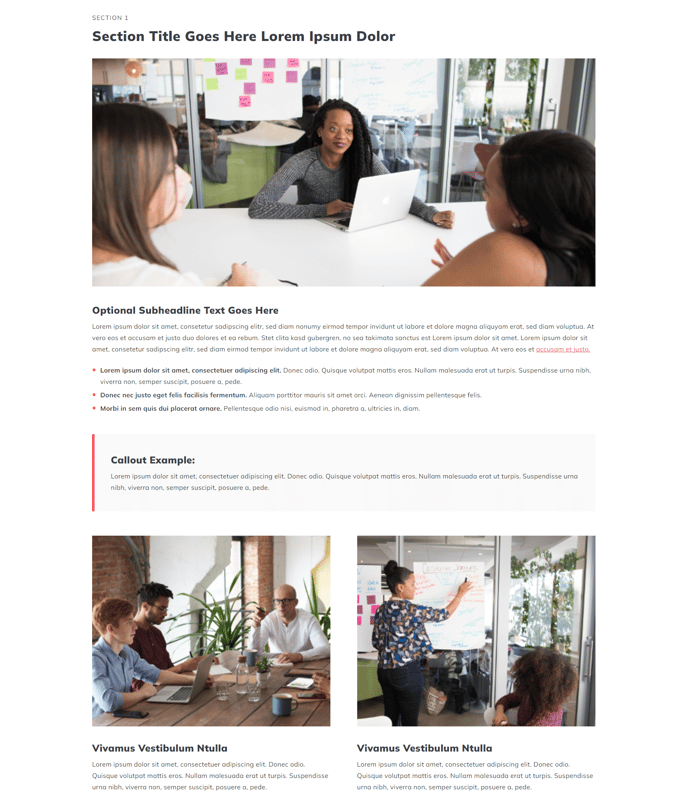
Content for a chapter in a pillar page. Includes a list, callout text, and two column section for calling out important information.
View a live demo of this section.
Modules:
- Section Heading
- HubSpot Linked Image
- Theme Rich Text
- Callout Box
- Columns
Usage Guide
The Pillar Chapter - Important Text section is specifically designed to highlight critical information within your pillar pages, making it perfect for emphasizing key takeaways, important statistics, or essential concepts that support your main topic clusters. This section combines multiple content formats to create visual hierarchy and improve reader engagement on longer-form content.
When you add this section through the HubSpot page editor’s drag-and-drop interface, you’ll immediately notice its structured layout that guides readers through important information in digestible chunks. The section works particularly well in the middle or towards the end of pillar pages where you need to reinforce important points or provide supporting evidence for your main arguments.
Visual Layout and Structure
The section creates a comprehensive content block that flows from top to bottom with clear visual separation. The Section Heading establishes context, while the HubSpot Linked Image provides visual interest and can link to related resources. The Theme Rich Text module allows for formatted content with lists, links, and styling options that maintain consistency with your brand guidelines.
The Callout Box serves as an attention-grabbing element perfect for statistics, quotes, or key insights that deserve special emphasis. Finally, the Columns module enables side-by-side content presentation, ideal for comparing concepts or presenting complementary information.
Implementation Tips
Consider using this section when your pillar content needs to break up long paragraphs of text or when you want to highlight research findings, expert quotes, or important disclaimers. The combination of modules makes it more visually engaging than standard text blocks while maintaining the professional appearance expected in thought leadership content. You can easily customize colors, fonts, and spacing through the theme settings to match your brand requirements.