
Related Posts
Set of posts related to the page with a heading.
View a live demo of this section.
Modules:
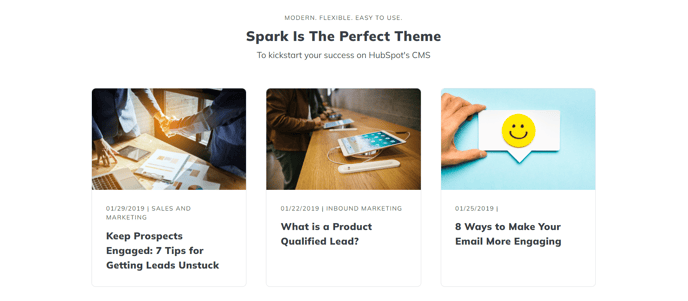
How to Use This Section
The Related Posts section creates an engaging content discovery area that encourages visitors to explore additional blog content on your HubSpot site. This pre-built section combines a customizable heading with an intelligent post recommendation system, making it ideal for blog post templates, resource pages, and content hubs.
When you add this section to a page through the HubSpot page editor’s drag-and-drop interface, you’ll have full control over both the visual presentation and content filtering. The Theme Rich Text module at the top allows you to craft compelling section headings like “You might also like” or “Related resources” using HubSpot’s rich text editor, complete with custom styling options available in your theme settings.
The Related Posts module automatically pulls content based on your configured criteria. You can set it to display posts from specific blog topics, filter by publication date, or show a curated selection of featured content. This flexibility makes the section particularly valuable on pillar pages where you want to showcase supporting blog posts, or on blog post templates to reduce bounce rates by presenting similar content.
Best practices for this section include positioning it near the bottom of blog posts to capture readers who’ve finished your content, using descriptive headings that clearly indicate the relationship between posts, and configuring the post count to match your page layout (typically 3-6 posts work best visually). The section maintains your theme’s consistent styling while adapting to different screen sizes, ensuring a seamless experience across desktop and mobile devices.
This section works especially well on blog post templates, resource centers, and topic cluster pages where content discoverability directly impacts user engagement and time on site.