
Contact
Simple page with contact information, contact form, and frequently asked questions.
Default Modules:
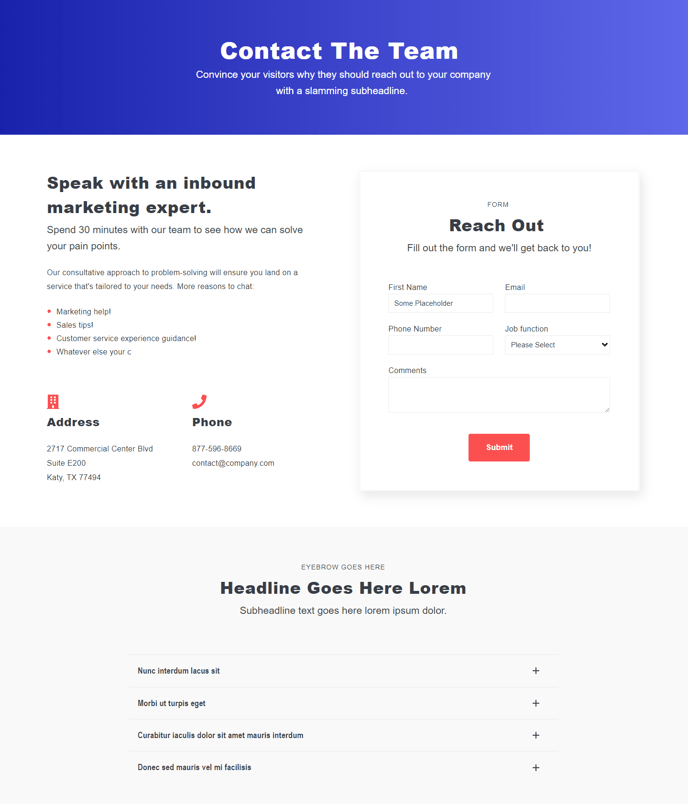
How to Use the Contact Template
The Contact template in Spark Premium provides a comprehensive foundation for your business’s contact page, combining essential contact information with lead generation capabilities. This template is specifically designed to convert visitors into leads while providing multiple ways for customers to reach your organization.
When you create a new page using this template, you’ll find six pre-configured modules that work together seamlessly. The Theme Rich Text module allows you to add your company’s contact details, office hours, and location information using HubSpot’s rich text editor. You can easily format addresses, phone numbers, and email addresses while maintaining consistent styling with your theme.
The Icons with Text module is perfect for highlighting different contact methods—phone, email, live chat, or social media—with accompanying visual icons. You can customize these icons and descriptions directly in the page editor without any coding knowledge.
The Theme Form module comes pre-configured but should be connected to your HubSpot forms for lead capture. Navigate to the module settings and select an existing HubSpot form, or create a new contact form that aligns with your lead qualification process. This integration ensures all form submissions automatically sync with your HubSpot CRM.
Use the Accordion module for your FAQ section to keep the page organized and scannable. This collapsible format prevents overwhelming visitors while still providing comprehensive information about your services, policies, or common questions.
Best practices: Place your most important contact method (usually phone or email) prominently in the Icons with Text section. Keep your FAQ accordion concise—aim for 5-8 frequently asked questions. Remember to update the Indexing and Social SEO module with location-specific keywords to improve local search visibility.