
Landing
Provide specific information or feature content for users to download.
Default Modules:
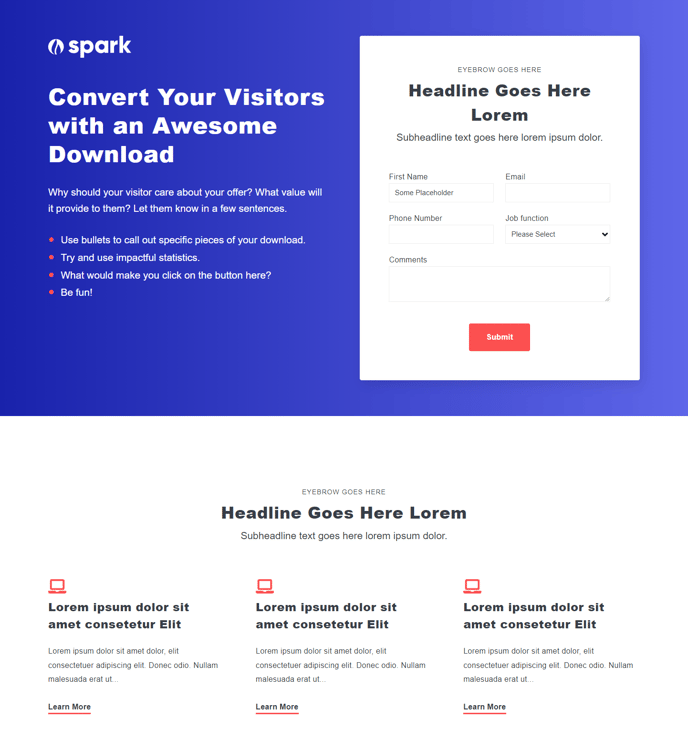
How to Use This Template
The Landing template in Spark Premium is specifically designed for high-conversion lead generation pages where your primary goal is to capture visitor information through downloads, sign-ups, or other conversion actions. Unlike blog post or standard website page templates, this layout strips away navigation distractions and focuses entirely on your conversion objective.
When you create a new page using the Landing template in HubSpot’s page editor, you’ll notice the HubSpot Logo module positioned prominently at the top, which helps maintain brand trust without the typical header navigation that might lead visitors away from your conversion goal. The Theme Rich Text and Icons with Text modules work together to clearly communicate your value proposition and benefits, while the Theme Form module serves as your primary conversion tool.
You can customize the form fields directly through HubSpot’s drag-and-drop editor to match your specific lead capture needs – whether you’re offering an ebook, webinar registration, or product demo. The Icons with Text module is particularly effective for highlighting key benefits or addressing common objections that might prevent form completion.
Best practices for this template: Keep your headline focused on the value visitors will receive, limit form fields to essential information only, and use the rich text areas to create urgency or social proof. The Schema module ensures your landing pages are properly structured for search engines, which is crucial if you’re driving organic traffic to your offers.
This template works exceptionally well for PPC campaigns, email marketing destinations, and social media promotions where you need a distraction-free environment optimized for a single conversion goal.