
Blog Index
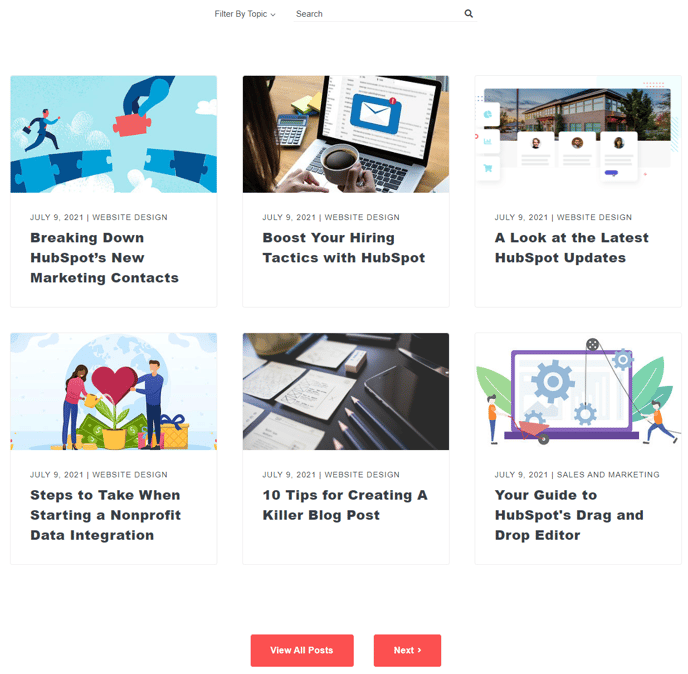
Adds a listing of blog posts to a blog listing template. Includes options for filters and a search bar.
View a live demo of this module.
Content
- Set a default image
- Show/hide tags (single or all), author, and/or date
- Enable search and filters
- Show/hide search
- Add a number of filters with a pick list of tags
Styles
Note: Change these styles in your Theme Settings under Components > Blog Listing.
- Edit border radius and border color of post items
How to Use This Module
The Blog Index module serves as the foundation for creating dynamic blog listing pages in your Spark theme. You’ll primarily use this module on dedicated blog listing templates or landing pages where you want to showcase multiple blog posts in an organized, searchable format.
When adding this module through the HubSpot page editor’s drag-and-drop interface, position it in your main content area after any hero sections or introductory content. The module automatically pulls published blog posts from your HubSpot blog, eliminating the need to manually update post listings.
Configure your content settings to match your site’s information architecture. The tag filtering system works particularly well if you maintain consistent tagging across your blog posts. Consider which metadata elements (author, date, tags) provide the most value to your visitors—showing all options isn’t always necessary and can create visual clutter.
Leverage the search functionality for blogs with extensive content libraries. This feature helps visitors quickly locate specific topics without scrolling through multiple pages. The search queries work across post titles, descriptions, and content.
For visual consistency, the module inherits styling from your Theme Settings under Components > Blog Listing. This centralized approach means changes apply across all instances of the module throughout your site. The default image setting proves especially useful for older posts that may lack featured images, maintaining a polished appearance across your entire blog archive.
Best practices: Use this module on pages with ample vertical space, as blog listings can extend significantly depending on your post volume and pagination settings. Consider the module’s placement relative to your site navigation to create logical user journeys from blog discovery to individual post consumption.