
Simple Menu
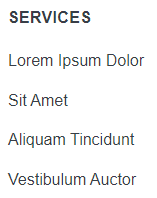
A HubSpot simple menu that is ADA compliant.
View a live demo of this module.
Content
- Edit menu content
How to Use This Module
The Simple Menu module provides a clean, accessible navigation solution that you can add to any page in your Spark theme. Unlike complex mega menus, this module focuses on straightforward navigation with built-in ADA compliance features, making it perfect for footer navigation, supplementary page menus, or sidebar navigation areas.
When editing the module in HubSpot’s page editor, you’ll find intuitive content fields that let you quickly build your menu structure. You can add multiple menu items with custom links, whether they point to internal HubSpot pages, external URLs, or anchor links within the same page. The module automatically handles proper semantic markup and keyboard navigation requirements to meet accessibility standards.
This module works particularly well on landing pages where you want to provide additional navigation without the complexity of your main site header. It’s also ideal for thank you pages, resource centers, and contact pages where visitors might need quick access to related content or key site sections.
Best practices for implementation:
- Keep menu items concise and descriptive for better user experience and accessibility
- Limit the number of items to maintain clean visual hierarchy
- Use consistent link text that clearly indicates the destination
- Test the module with keyboard navigation to ensure all links are accessible
The Simple Menu integrates seamlessly with Spark’s responsive design system, automatically adapting to different screen sizes while maintaining readability and usability. You can drag and drop this module into any flexible column or section within your page layout, and it will inherit the appropriate spacing and typography from your theme’s global styles.