
Testimonials Slider
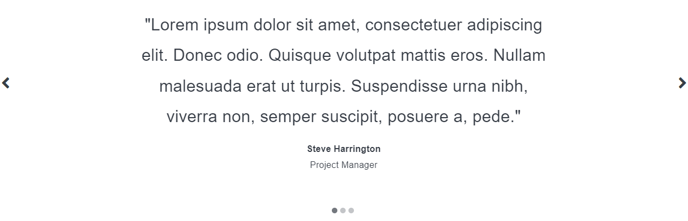
A simple slider of testimonials.
View a live demo of this module.
Content
- Add as many testimonials as you want
- Include quote and meta text (name and title)
Styles
- Set Dark Mode
- Change text alignment
- Edit padding
Note: Edit these following styles from your Theme Settings under the Sliders section.
- Change arrow and arrow hover colors
- Change dot (pagination) and dot hover colors
- Change Dark Mode arrow and dot colors
Note: Edit these following styles from your Theme Settings under the Components > Testimonials section.
- Customize quote text styling
- Customize meta text styling
How to Use This Module
The Testimonials Slider module helps you showcase customer feedback and social proof in an engaging, space-efficient format on your HubSpot pages. This rotating carousel displays multiple testimonials without taking up excessive vertical space, making it ideal for homepage hero sections, dedicated testimonials pages, or as supporting content on service and product pages.
To add this module to any page, simply drag it from the module library in the HubSpot page editor onto your desired location. The slider works particularly well on landing pages where you need to build trust quickly, and on about pages where visitors want to understand your credibility.
When configuring your testimonials, focus on creating a mix of customer types that represent your target audience. Each testimonial entry allows you to include the customer’s quote along with their name and title, which helps establish authenticity. For maximum impact, aim for 3-5 testimonials that highlight different benefits or use cases of your product or service.
The module’s Dark Mode setting is especially useful when placing the slider over darker background sections or images, ensuring your testimonials remain readable regardless of your page design. The text alignment options let you match your overall page layout—center alignment works well for hero sections, while left alignment often fits better in sidebar placements.
Pro tip: Take advantage of the global slider styling options in your theme settings to maintain visual consistency if you’re using multiple slider modules throughout your site. The arrow and dot customization options ensure the navigation elements complement your brand colors and overall design aesthetic.