
Contact
Share frequently asked questions, location, and contact information.
Default Modules:
How to Use This Template
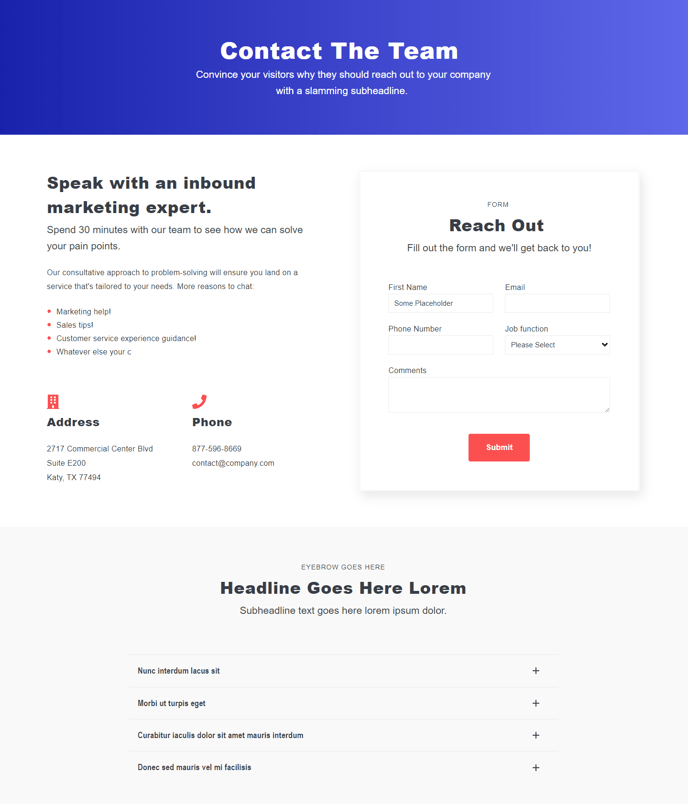
The Contact template in the Spark theme is specifically designed to create a comprehensive hub for customer inquiries and support. Unlike standard landing page templates, this contact-focused layout combines informational modules with interactive elements to reduce friction between visitors and your business.
When you create a new page using this template in the HubSpot page editor, you’ll notice the strategic arrangement of modules flows from general information to specific contact methods. The Theme Rich Text module at the top lets you establish context with office hours, response times, or a welcoming message. This sets proper expectations before visitors engage with your contact form.
The Icons with Text module works particularly well for displaying multiple contact methods at a glance – phone numbers, email addresses, or physical locations. You can customize the icons through the module settings to match each contact type, creating visual hierarchy that helps visitors quickly find their preferred communication channel.
The integrated Theme Form module connects directly to HubSpot’s CRM, automatically creating contacts and conversation threads. When configuring your form, consider which fields are essential versus optional – shorter forms typically see higher completion rates for contact inquiries.
The Collapsible Text module at the bottom serves as an expandable FAQ section, addressing common questions before they reach your inbox. This reduces support volume while improving user experience. You can organize FAQs by topic using multiple instances of this module.
To maximize this template’s effectiveness, ensure your global theme settings include consistent brand colors and fonts. The contact template inherits these settings, maintaining visual consistency with your main site while serving its specialized function as your primary conversion point for direct customer communication.