
Landing
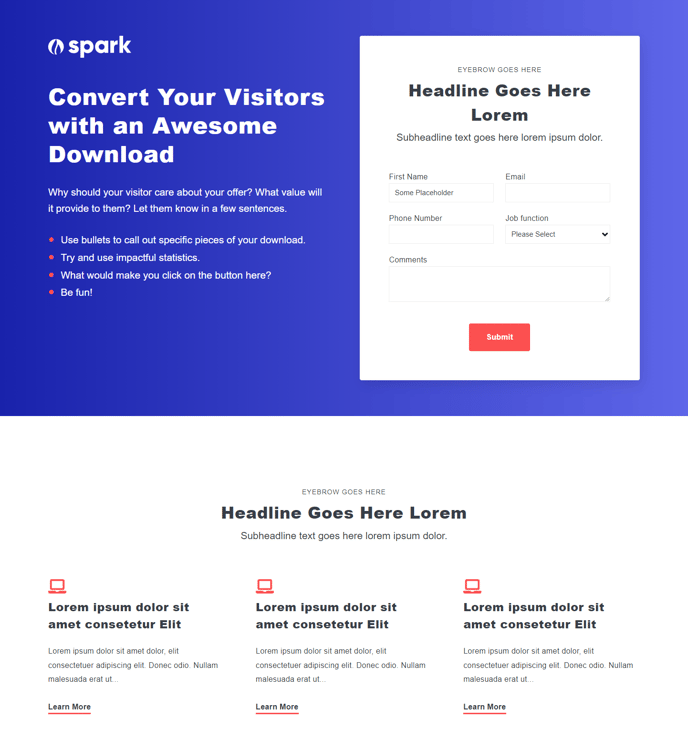
Feature content for download or to provide specific information.
Default Modules:
- HubSpot Logo
- Theme Rich Text
- Theme Form
- Icons with Text
How to Use the Landing Template
The Landing template is specifically designed for conversion-focused pages where you need to capture leads or drive specific actions. Unlike the Spark theme’s other page templates, the Landing template strips away navigation distractions and emphasizes your core message and call-to-action.
Setting Up Your Landing Page
When you create a new page in HubSpot’s page editor and select the Landing template, you’ll get a streamlined layout that guides visitors toward your primary conversion goal. The template’s modular structure allows you to drag and drop components to match your campaign needs, whether you’re promoting an ebook download, webinar registration, or product demo.
Optimizing for Conversions
The Theme Form module positioned prominently on this template integrates seamlessly with HubSpot’s marketing automation tools. You can customize form fields directly in the page editor and connect submissions to your lead nurturing workflows. The Theme Rich Text module gives you flexible content formatting options to craft compelling headlines and benefit statements that support your conversion goal.
Visual Hierarchy and Trust Signals
The Icons with Text module works particularly well on landing pages to highlight key benefits or features in a scannable format. Position this module to reinforce your value proposition with visual elements that break up text-heavy sections. The HubSpot Logo module can be swapped for your own brand logo through the theme settings, maintaining brand consistency while leveraging HubSpot’s hosting infrastructure.
For best results, keep your landing page focused on a single offer and use the template’s built-in spacing and typography settings to create clear visual hierarchy that guides visitors toward your conversion form.