
Theme Buttons
Easily add styled buttons.
View a live demo of this module.
Content
- Add as many buttons as you want
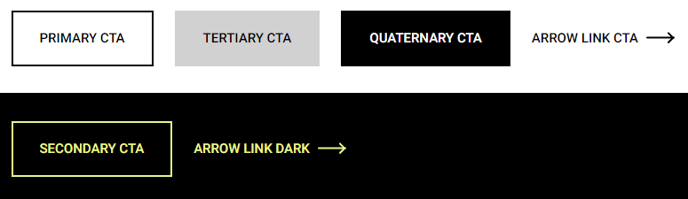
- Select color (primary, secondary, tertiary, quaternary, arrow link)
- Edit text and link
- Change button alignment
Styles
- Set dark mode (only applicable to arrow link)
How to Use This Module
The Theme Buttons module is designed to create compelling call-to-action sections throughout your Traverse site. You can drag this module into any page template from the HubSpot page editor, making it ideal for landing pages, product pages, and service sections where you need to guide visitors toward specific actions.
When building conversion-focused pages, consider placing Theme Buttons modules at strategic points like after product descriptions, within hero sections, or at the end of blog posts. The module’s flexibility allows you to create everything from simple single-button CTAs to multi-button comparison sections where visitors can choose between different options or pricing tiers.
Button styling options work seamlessly with your Traverse theme’s color palette. Primary buttons typically use your brand’s main color for high-priority actions like “Buy Now” or “Get Started,” while secondary and tertiary options provide visual hierarchy for supporting actions. The arrow link style is perfect for subtle navigation elements or “Learn More” prompts that don’t require heavy visual emphasis.
The alignment controls become particularly useful when working with different page layouts. Center alignment works well in hero sections and standalone CTA blocks, while left or right alignment integrates naturally within content columns or alongside images and text modules.
For dark mode compatibility, the arrow link option automatically adjusts its appearance based on your page’s background color settings, ensuring readability across different sections of your site. This makes it an excellent choice for modules placed over background images or in alternating light and dark content sections.
Remember to keep button text concise and action-oriented. The module performs best when each button has a clear, specific purpose that aligns with your visitor’s journey through your site.