
Hero - Contact
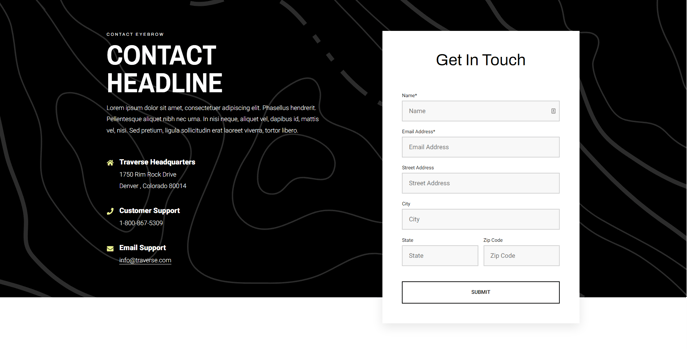
A hero with contact information and a form that overlaps the section below it.
View a live demo of this section.
Modules
How to Use This Section
The Hero - Contact section is designed to serve as a powerful first impression on your contact pages, combining visual appeal with immediate functionality. Unlike standard hero sections, this component features a unique overlapping design where the contact form extends beyond the hero boundary, creating visual depth and drawing attention to your primary call-to-action.
When you add this section through HubSpot’s page editor, you’ll find it works exceptionally well on dedicated contact pages, service inquiry pages, or consultation request landing pages. The overlapping form design means you should consider the background color and content of the section that follows it, as the form will visually integrate with that area.
The three core modules work together strategically: use the Theme Rich Text module for your main headline and supporting copy, the Feature Items module to highlight your contact methods (phone, email, location), and the Theme Form module for lead capture. This combination allows visitors to either contact you directly or submit an inquiry without scrolling.
Pro tip: When customizing the feature items for contact information, consider adding icons through the theme settings to make each contact method instantly recognizable. The overlapping form is particularly effective when styled with a subtle shadow or background color that contrasts with both the hero section and the content below.
This section performs best when placed at the top of your page structure, as the overlapping design assumes it will flow into additional content sections. For mobile responsiveness, the form automatically adjusts to stack properly while maintaining the visual hierarchy that makes this hero section distinctive within the Traverse theme’s layout options.