
Hero - Two Column with Gallery
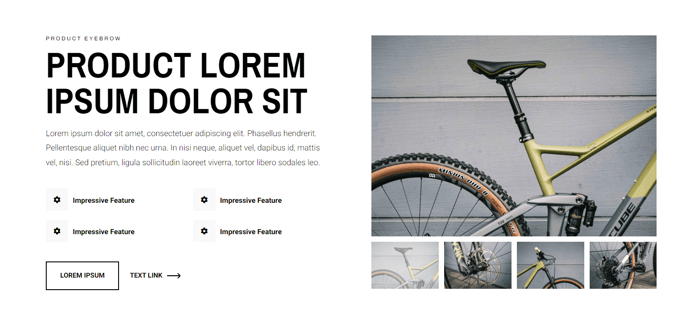
A two-column hero with text and image gallery.
View a live demo of this section.
Modules
How to Use This Section
The Hero - Two Column with Gallery section provides a powerful way to create an engaging homepage or landing page header that balances compelling copy with visual storytelling. This layout divides your hero area into two distinct zones: one for your primary messaging using the Theme Rich Text module, and another for an interactive Image Gallery that showcases multiple products, features, or brand imagery.
You can add this section to any page through HubSpot’s page editor by selecting it from the Traverse theme’s pre-built sections library. Once added, simply drag and drop your content into the designated areas. The Theme Rich Text module on the left supports full formatting options, allowing you to craft headlines, subheadings, calls-to-action, and descriptive text with complete control over typography and styling that matches your theme settings.
The Image Gallery module works particularly well for e-commerce scenarios where you want to highlight multiple product categories, showcase a portfolio of work, or display before/after transformations. Unlike a single hero image, this gallery format keeps visitors engaged longer and provides multiple visual entry points into your content.
Best practices for this section include:
- Keep your text concise but compelling, as the gallery will compete for attention
- Use high-quality images with consistent dimensions for the cleanest presentation
- Consider this section for product launch pages, service overview pages, or any scenario where visual variety supports your primary message
- Test different gallery layouts through the module settings to find what works best with your specific images
This section performs exceptionally well as an alternative to traditional single-image heroes when you need to convey diversity, choice, or multiple value propositions immediately upon page load.