
Comparison Table
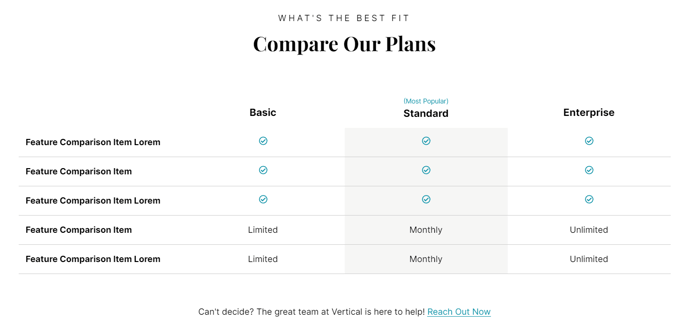
A table to compare features of different products or product levels.
View a live demo of this module.
Content
- Include a header/footer
- Choose to include text, custom icon, or FontAwesome icon each featured item column
- Add an eyebrow to heading columns to call out a column
Styles
- Set to Dark Mode
- Change header/footer alignment
- Change icon height
- Change background colors and text colors of the header row and even/odd columns
- Edit the border style
Usage Guide
The Comparison Table module is specifically designed to help SaaS and technology companies showcase their pricing tiers, feature comparisons, or service packages in a visually compelling format. This drag-and-drop module works exceptionally well on pricing pages, product comparison landing pages, and service overview pages where you need to present multiple options side-by-side.
When adding this module to your pages through the HubSpot page editor, consider placing it as a focal point in your page layout—typically after introducing your products but before testimonials or call-to-action sections. The module’s responsive design ensures your comparison tables remain readable across all devices, automatically adjusting column widths and stacking behavior for mobile users.
Best practices for content editors: Start by determining how many comparison columns you need before adding the module to your page. The eyebrow text feature is particularly effective for highlighting your most popular or recommended option—use phrases like “Most Popular” or “Best Value” to guide visitor decision-making. When choosing between text, custom icons, or FontAwesome icons for your feature rows, maintain consistency throughout the table for a professional appearance.
The Dark Mode styling option integrates seamlessly with the Vertical theme’s modern aesthetic and works particularly well for technology companies wanting to emphasize a cutting-edge brand image. Take advantage of the background color customization to create visual hierarchy—consider using your brand’s accent color for featured columns or alternating row colors to improve readability.
This module pairs effectively with the Vertical theme’s other modules like Hero sections above it and Testimonial or CTA modules below it, creating a complete conversion-focused page flow.