
Show/Hide Content
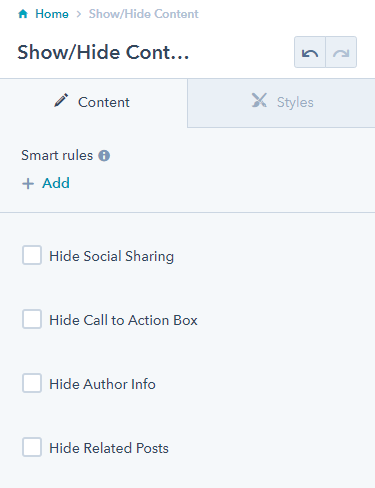
Choose what content to show in a blog post.
Note: This is a built-in module, meaning you’ll need to open the Contents tab of the page editor sidebar to select it. This module is made specifically to alter content on this theme’s Blog Post template and does not render any visible content itself.
Content
- Show/hide social sharing, call to action, author, and/or related posts
Usage Guide
The Show/Hide Content module gives you granular control over which elements appear on your blog posts without requiring any custom coding. This is particularly valuable when you want to customize individual blog posts differently from your default blog template settings.
Unlike standard drag-and-drop modules that add visual content to your pages, this module functions as a content controller that works behind the scenes. You’ll find it most useful when you need to create different types of blog posts with varying layouts—for example, announcement posts that don’t need related articles, or internal updates where social sharing isn’t appropriate.
When to use this module:
- Creating minimalist blog posts that focus solely on content
- Publishing internal company updates where social features aren’t needed
- Customizing high-priority posts with specific call-to-action strategies
- A/B testing different blog post configurations to improve engagement
Since this module only affects the Blog Post template, you won’t see any changes when adding it to other page types like landing pages or website pages. The module respects your theme’s default styling while simply toggling the visibility of specific content blocks.
Pro tip: Consider your content strategy before hiding elements. Social sharing buttons can increase your content’s reach, while related posts help visitors discover more of your content. Author information builds trust and authority. Use this module strategically rather than hiding elements by default.
To see your changes in action, make sure to preview your blog post after configuring the module settings. The hidden elements will be completely removed from the page layout, allowing other content sections to flow naturally without awkward spacing gaps.