
Showcase Slider
A multi-slide slider with image and title to showcase services/products.
Note: The section this module is added to should have it’s Content Alignment set to Full width.
View a live demo of this module.
Content
- Include heading
- Change number of slides to show at a time on desktop, laptop, tablet, and mobile
- Edit screen reader text for slider (next button, previous button, pagination, etc)
Styles
- Set Dark Mode
- Change heading alignment
- Set slider type (slide, loop, rewind)
- Edit space between slides
- Change aspect ratio and hover animation of images
- Change heading level of slide items
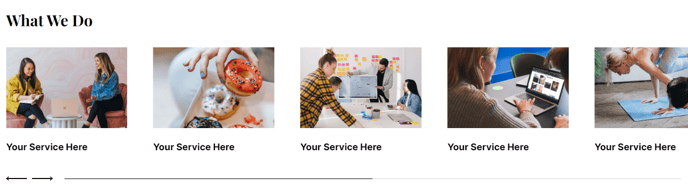
How to Use This Module
The Showcase Slider module is perfect for highlighting your product portfolio, service offerings, or client testimonials in an engaging visual format. This module works particularly well on homepage sections, service pages, or dedicated portfolio areas where you want to present multiple items without overwhelming visitors with too much content at once.
When adding this module through the HubSpot page editor’s drag-and-drop interface, you’ll want to place it in a section that can accommodate its full-width design requirements. The module automatically adapts to different screen sizes, making it mobile-responsive without additional configuration on your part.
Best practices for content creation: Keep your slide titles concise and action-oriented, as they serve as the primary navigation element for users. Upload high-quality images that maintain visual consistency across all slides—this creates a more professional appearance and better user experience. Consider using images with similar lighting, color schemes, or composition styles.
The responsive slide display options are particularly useful for controlling information density. On desktop, you might show three slides simultaneously to give users multiple options, while mobile devices can display one slide at a time for better focus and touch navigation.
For accessibility optimization, take advantage of the screen reader text customization options. This ensures your slider remains usable for visitors using assistive technologies. The module’s built-in accessibility features work seamlessly with HubSpot’s content delivery network.
This module integrates well with other Vertical theme components, especially when used above or below content sections that provide additional context about the showcased items. Consider pairing it with call-to-action modules or detailed service description sections to create complete user journeys.