
Theme Buttons
Custom call to action buttons.
View a live demo of this module.
Content
- Add as many buttons as you need
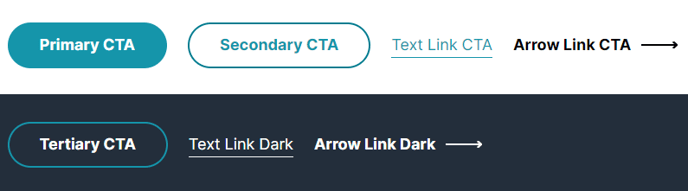
- Select a color for each call to action from button colors set in your Theme Settings (Primary, Secondary, Tertiary, Arrow Link, Text Link)
- Change alignment of the buttons on the page (left, center, right)
Styles
- Set Dark Mode (only applicable to arrow and text link)
Usage Guide
The Theme Buttons module serves as your primary tool for creating compelling call-to-action sections that drive conversions on your SaaS or technology website. Unlike standard HubSpot CTA modules, this custom module is specifically designed to match the Vertical theme’s modern aesthetic while providing enhanced flexibility for multi-button layouts.
You can drag and drop this module onto any page template in the HubSpot page editor, making it particularly effective on landing pages, service pages, and homepage sections where you need to present multiple conversion paths. For example, you might use it to display “Start Free Trial,” “Schedule Demo,” and “View Pricing” buttons together, giving visitors clear next steps based on their readiness to purchase.
Best practices for implementation: Position the module strategically after compelling content sections like feature descriptions or testimonials to maximize conversion potential. The center alignment works well for hero sections and standalone CTA blocks, while left alignment integrates seamlessly within content flows on longer pages.
The module’s integration with your Theme Settings ensures brand consistency across your entire site. When you update button colors in the theme customizer, all instances of this module automatically reflect those changes, eliminating the need to manually update individual buttons across multiple pages.
Dark mode functionality adds versatility for sections with darker backgrounds, particularly useful when overlaying buttons on hero images or colored content sections. This feature ensures your arrow and text links maintain proper contrast and readability regardless of the underlying design.
Consider combining this module with other Vertical theme components like testimonials or feature grids to create comprehensive conversion-focused page sections that guide visitors through your sales funnel effectively.