
Comparison Table
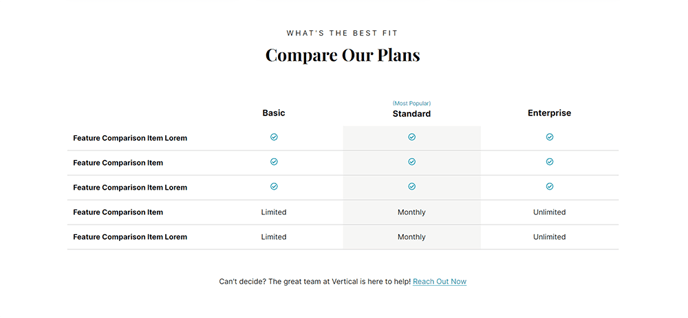
Table comparison for products, services, service tiers, etc.
View a live demo of this section.
Modules:
Usage Guide
The Comparison Table section provides a structured visual layout for showcasing product features, pricing tiers, or service comparisons on your HubSpot site. This section is particularly valuable for SaaS companies using the Vertical theme who need to present complex feature matrices or pricing information in an easily digestible format.
When you add this section through the page editor’s drag-and-drop interface, you’ll have access to the integrated Comparison Table module that handles all the data presentation. The section works exceptionally well on pricing pages, product comparison landing pages, and service tier overview pages where visitors need to evaluate multiple options side-by-side.
Best practices for implementation:
- Place this section early on pricing pages to address visitor questions upfront and reduce bounce rates
- Use consistent terminology across all comparison columns to avoid confusion
- Limit comparisons to 3-5 options maximum for optimal mobile viewing experience
- Consider the section’s bold visual design when planning your page flow — it naturally draws attention and works well as a conversion-focused element
The section automatically adapts to mobile devices by allowing horizontal scrolling or stacking columns vertically, depending on your content volume. You can customize colors, spacing, and typography through the theme settings panel to match your brand guidelines.
Pro tip: This section pairs effectively with testimonial or FAQ sections placed directly below it, as visitors often want social proof or additional details after reviewing comparison data. The Vertical theme’s content flow design ensures smooth transitions between these complementary sections.