
Hero - Form
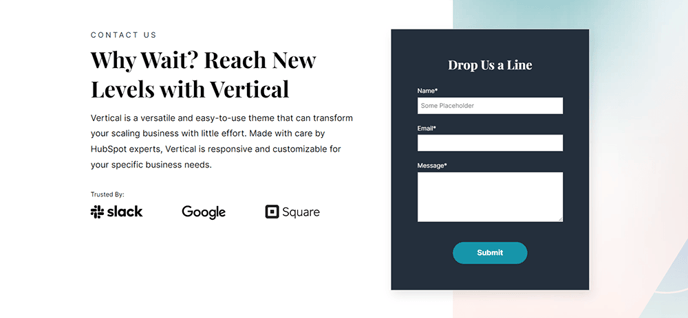
Two-column hero with text and logos on the left and a form on the right.
View a live demo of this section.
Modules:
How to Use This Section
The Hero - Form section is designed to maximize lead generation by combining compelling messaging with an immediate conversion opportunity. This two-column layout places your value proposition, supporting text, and trust indicators like customer logos on the left, while positioning a lead capture form prominently on the right side of the screen.
When to choose this section: Use Hero - Form as your homepage hero when lead generation is your primary goal, or on dedicated landing pages for campaigns, product demos, or gated content downloads. This layout works particularly well for SaaS companies offering free trials, consultations, or product demos.
Setting up your content: In the HubSpot page editor, you can customize the left column’s headline, supporting copy, and logo grid through the Hero - 2 Columns module settings. The form on the right pulls from your HubSpot forms, so you can select any existing form or create a new one specifically for this page. Consider using progressive profiling to reduce form friction for returning visitors.
Design considerations: The Vertical theme automatically handles responsive behavior, stacking the form below the text content on mobile devices. You can adjust the section’s background color, padding, and text alignment through the theme’s style options. For optimal conversion rates, keep your form fields to a minimum and ensure your headline clearly communicates the value visitors will receive.
Pro tip: Test different form lengths and headlines using HubSpot’s A/B testing features. The prominent placement of this section makes it ideal for conversion optimization experiments, and you can easily swap out forms or adjust messaging without touching any code.