
Related Blogs - Dark
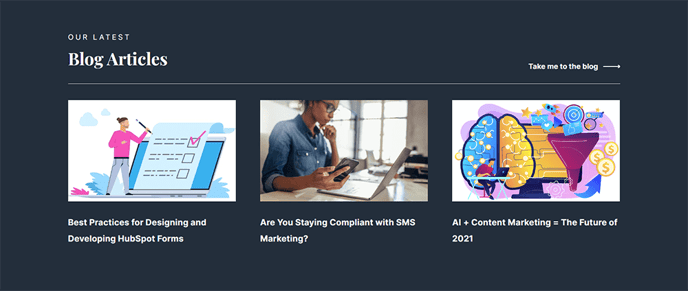
A showcase of blog posts with a dark background.
View a live demo of this section.
Modules:
Usage Guide
The Related Blogs - Dark section creates a visually striking way to showcase your blog content with a sleek dark background that aligns perfectly with the Vertical theme’s modern aesthetic. This section is particularly effective for SaaS and technology companies looking to maintain engagement by directing readers to additional relevant content.
You can add this section to any page in your HubSpot CMS using the page editor’s drag-and-drop interface. Simply navigate to the sections panel and locate “Related Blogs - Dark” in your available content sections. The dark background treatment makes this section ideal for breaking up content on pages with lighter sections above and below, creating visual contrast that draws attention to your featured blog posts.
When configuring the Related Posts module within this section, you have several display options through the module settings. You can choose to show posts based on topic tags, recent publication dates, or manually select specific posts that relate to your current page content. This flexibility allows you to create curated content experiences that guide visitors deeper into your site.
This section works exceptionally well on blog post pages to encourage continued reading, but it’s equally effective on service pages, case studies, or your homepage to highlight thought leadership content. The dark styling complements the Vertical theme’s bold design philosophy while ensuring your blog titles and excerpts remain highly readable.
Pro tip: Consider the overall page layout when placing this section. The dark background creates a natural stopping point, making it perfect for positioning near the bottom of pages where you want to transition visitors from your main content to exploring your blog archive.