
Blog Post
A blog post including a call to action, author information, social sharing, and related resources.
Note: Read this HubSpot knowledge base article for a guide on applying a template to your blog posts.
Default Modules in Global Content:
Note**:** Updating Global Content will make the changes across all blog posts.
Default Modules:
- Back to Top
- Transparent Header
- Show/Hide Content
- Social Sharing
- Call to Action Box
- Blog Post Author
- Related Posts
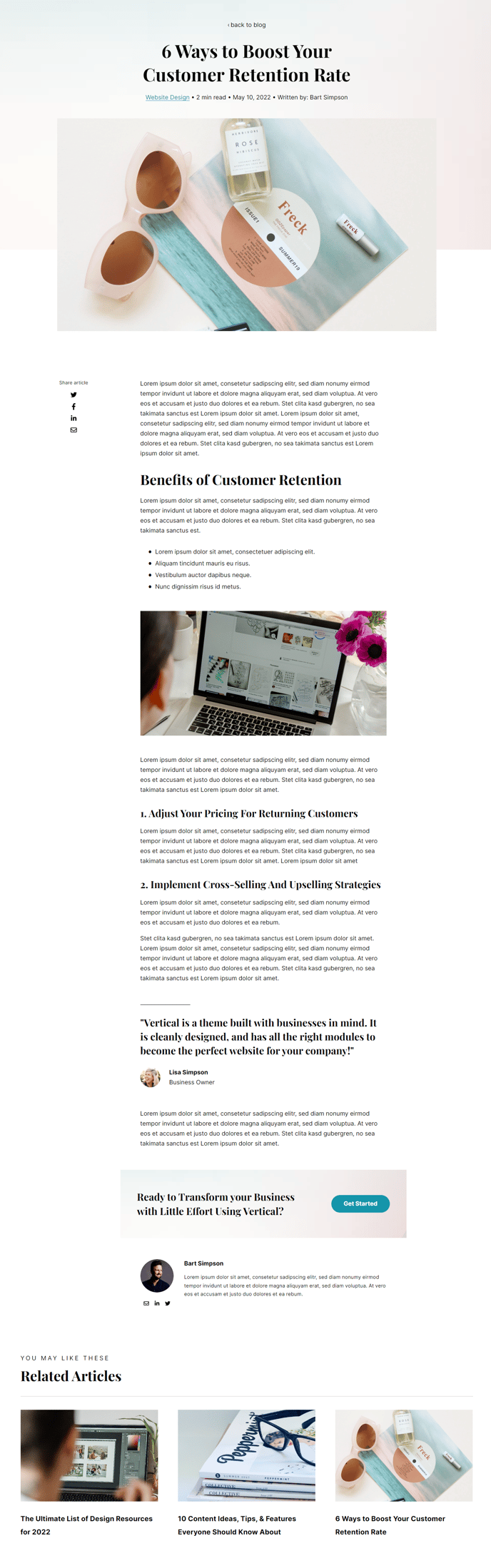
How to Use This Template
The Vertical blog post template is specifically designed to maximize reader engagement and drive conversions for SaaS and technology companies. Unlike standard blog templates, this layout prioritizes visual storytelling through its Hero - Blog Post module in the global content area, which creates a striking first impression with customizable background imagery and typography that aligns with your brand.
When you create or edit a blog post using this template, you’ll work within HubSpot’s page editor where the pre-configured modules are already arranged in an optimal reading flow. The Transparent Header module creates a seamless visual transition from your navigation to the hero section, while the Show/Hide Content module allows you to create expandable sections for detailed technical information without overwhelming casual readers.
Setting up your blog posts effectively:
Position your Call to Action Box strategically within your content using the drag-and-drop editor to capture leads at peak engagement moments. The Blog Post Author module builds credibility by showcasing team expertise—particularly valuable for thought leadership content in the tech industry.
The Social Sharing module is optimized for professional networks like LinkedIn, making it easy for your B2B audience to share your content. Configure sharing settings in your HubSpot blog settings to control which platforms appear.
Pro tip: Leverage the Related Posts module by using HubSpot’s topic clustering features in your content strategy. This module automatically surfaces relevant content based on topic tags, keeping visitors engaged longer and improving your site’s SEO performance.
The Back to Top module becomes especially useful for in-depth technical articles common in SaaS blogging, ensuring readers can easily navigate longer posts without losing their place.