
Flex
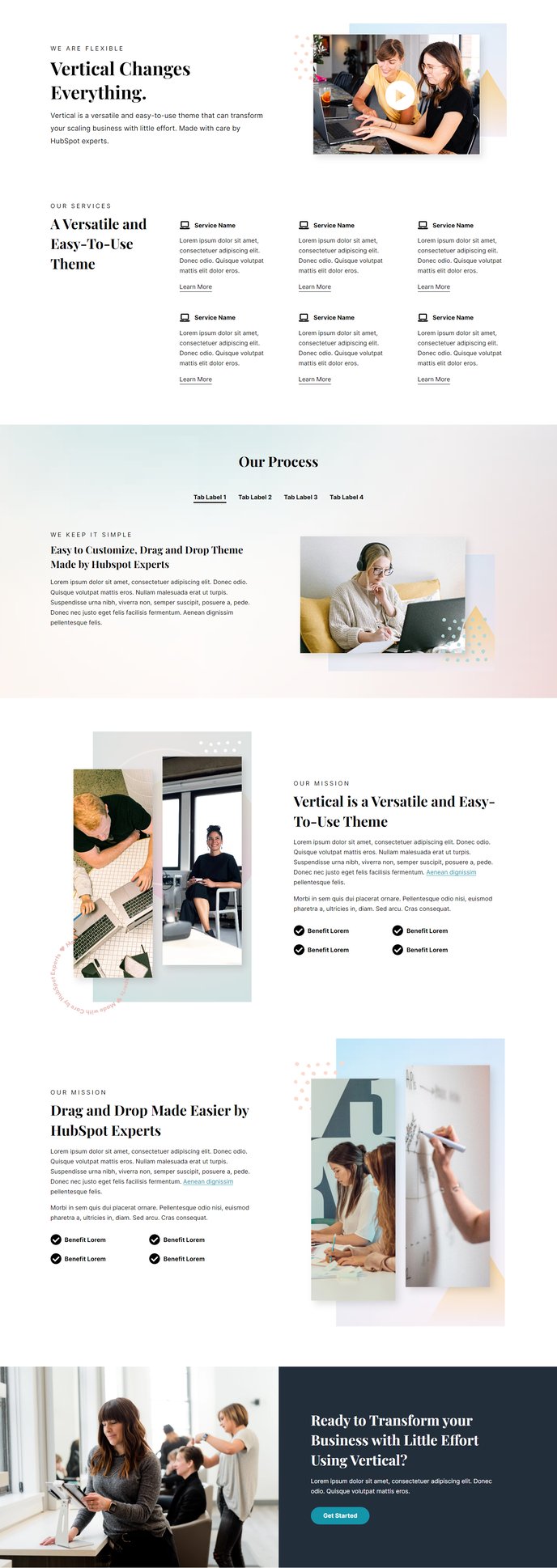
Compilation of several modules for use on inner content pages.
Default Modules:
- Back to Top
- Transparent Header
- Hero - 2 Columns
- Feature Items
- Tabbed Content
- Text and Image Columns
- Full Width Two Columns
How to Use the Flex Template
The Flex template serves as your go-to solution for creating versatile inner content pages that require multiple content sections without the constraints of a rigid layout. Unlike single-purpose templates, Flex gives you complete control over your page structure through HubSpot’s drag-and-drop page editor.
When to Choose Flex
This template works exceptionally well for product feature pages, service detail pages, resource hubs, and comprehensive landing pages where you need to present information in varied formats. The combination of hero sections, feature showcases, and content blocks makes it ideal for SaaS companies explaining complex products or technology firms demonstrating multiple capabilities on a single page.
Customizing Your Flex Pages
After selecting the Flex template in your page editor, you can rearrange the default modules using HubSpot’s drag-and-drop interface. The transparent header automatically adjusts to your theme’s global navigation settings, while the hero section provides immediate visual impact for visitors arriving from search results or internal links.
Content Strategy Tips
Start with the Hero - 2 Columns module to establish your page’s primary message, then use Feature Items to highlight key benefits or capabilities. The Tabbed Content module works particularly well for organizing technical specifications or feature comparisons, while Text and Image Columns help break up longer content sections for better readability.
Theme Integration
The Flex template automatically inherits your Vertical theme’s typography, color schemes, and spacing configurations from the theme settings panel. This ensures visual consistency across your site while giving you maximum flexibility in content presentation. You can also add additional compatible modules from the Vertical theme library to further customize each page.