A sales training franchisor moved lead routing for 165+ franchises into HubSpot
The Customer
Our client is a global sales training company that sells through a network of more than 165 franchises, with locations across North America and Europe. Corporate marketing generates leads through webinars, virtual events, content and the website, then hands each one to the franchise best placed to win it.
Every franchise runs its own HubSpot portal. A corporate portal sits above them, connected to each franchise portal through SyncSmart’s Portals app, which SyncSmart built for the client years before this project and our team supported.
The Challenge
Lead routing ran through a separate application outside HubSpot that our team did not build. The corporate portal sent each lead to it and waited for a franchise to come back. Because the rules lived in that application’s code, small changes needed a developer. A territory adjustment could take weeks, and adding a franchise meant a code update.
The geography was too blunt. Routing by distance alone sent leads from Buffalo, New York, to Canadian franchises because they were the closest. The rules also had no way to tell a franchise’s primary focus area apart from the wider territory it covers.
When a lead failed to route, the team had little visibility into why. Finding the leads that missed a franchise after a large webinar or event was manual work.
The client wanted routing to live in HubSpot, where its team already worked, with rules its own admins could read and change.
The Solution
We designed and built a lead router inside the corporate HubSpot portal from workflows, custom objects and a small amount of custom code. The project started with a kickoff in June 2024 and a solution brief, and the client confirmed the routing rules in writing during design. We built and tested in a sandbox portal through the summer, moved to production in the fall and went live on December 10, 2024.
Territories as data. A custom Territory object holds every coverage area, in the US and abroad, with its country, state or region and map coordinates. Each franchise’s company record is linked to its territories with labels that mark the primary focus area and the secondary territory, and it carries the franchise’s exception zip codes. We imported the client’s existing territories into the new object and ran a historical sync to link them to the franchise records.
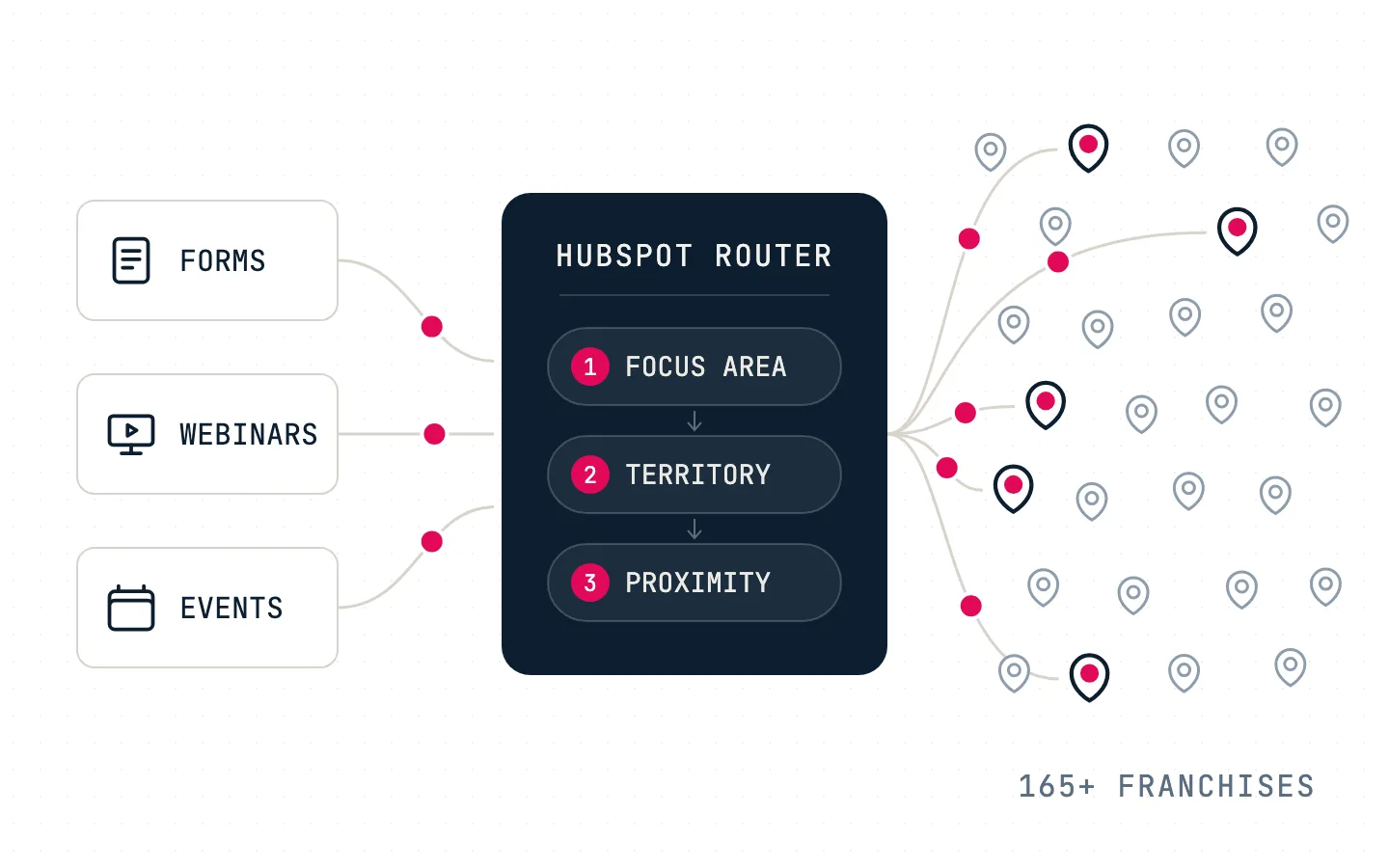
The routing rules. When a contact converts on a qualifying event, such as a form, a webinar registration or an event, the router first checks whether the lead is eligible for a franchise. It then looks for a match in order: the primary focus area, then the territory, then proximity. The proximity step uses map coordinates to find the nearest franchise in the same country, so a lead near a border stays with a franchise in its own country. When more than one franchise qualifies, the one that received a lead least recently goes first.
Handoff and follow-through. Once a franchise is chosen, the router writes the franchise, its point of contact and the assignment date to the contact, and Portals delivers the lead into that franchise’s portal. The point of contact gets an email notification, with a separate notification flow for international franchises. If the franchise has not started working the lead, a reminder follows, and the client’s admins set that delay themselves. A lead the franchise turns down or leaves untouched can be pulled back to the corporate portal and routed to the next eligible franchise. Every assignment is also saved as its own record, so the history of where a lead went is kept.
Reporting and exceptions. Dashboards show leads per franchise by date, region and point of contact, daily assignments, disqualified leads with the reason, and assigned leads by source. An exceptions report lists leads outside every territory and leads that went nowhere with no action taken. Exceptions were the client’s top reporting priority.
Handover. We wrote the solution documentation, an admin handbook and the requirements and solution briefs, recorded a video walkthrough, and trained the client’s CRM admin and reporting lead to maintain and troubleshoot the router.
What They Got
At go-live, lead routing moved out of the separate application and into the portal the client’s team already worked in. Territories, focus areas and exception zip codes became records the client’s admins can edit, so changing a territory or bringing a new franchise into rotation is a record update with no code change. Every assignment is logged, routing exceptions show up on a report, and franchises get a reminder when a lead sits.
No figures on routing speed, error rates or time saved were recorded after launch, so we make no claims about them.
Wrapping Up
Our standard on a build like this is that the client can run it without us. We had the routing rules confirmed in writing, tested everything in a sandbox before production, and put the rules where the client’s admins could see and change them. Lynton now builds AI-native websites on open infrastructure; see our current work at /case-studies.