Why Is the Alignment Dropdown in the HubSpot Default Divider Module Not Working?
HubSpot has been updating its modules to move certain field types into the Styles tab. The Alignment dropdown in the Content tab is now obsolete, and you will need to go to the Styles tab > Typography > Text Alignment to change the alignment of the divider.
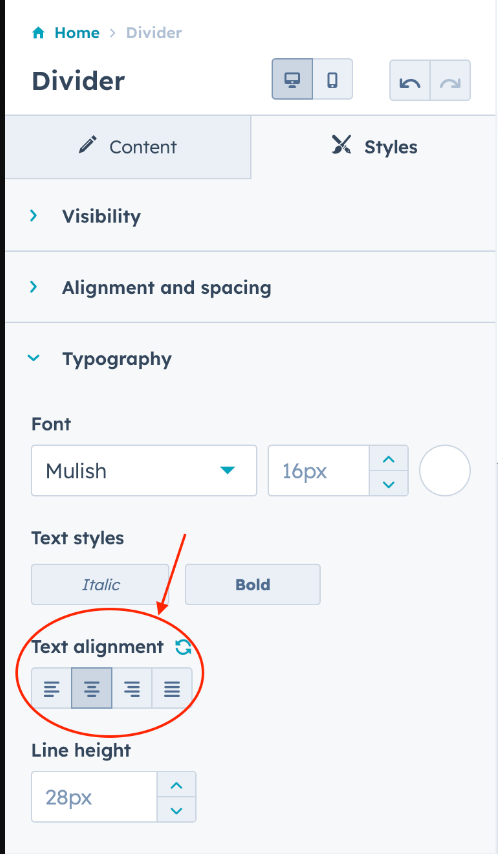
Understanding HubSpot’s Module Interface Changes
This alignment issue affects the Divider module across all HubSpot themes, including those built by Lynton. The divider module serves as a visual separator between content sections on your pages, helping to create clear breaks in your layout and improve readability for visitors.
When you’re working in the HubSpot page editor and drag a divider module onto your page, you’ll notice that the alignment controls in the Content tab no longer respond to changes. This is part of HubSpot’s ongoing effort to standardize their module interface and consolidate styling options into a dedicated location.
Best practices for using dividers effectively:
You can customize your divider’s appearance beyond just alignment by exploring other options in the Styles tab. Look for Border settings to adjust thickness, color, and style (solid, dashed, or dotted lines). The Spacing controls let you add padding above and below the divider to create the perfect amount of white space.
Divider modules work particularly well on landing pages where you need to separate form sections from testimonials, or on blog posts to break up long content blocks. They’re also useful in service pages to distinguish between different offerings or pricing tiers.
Pro tip: If you’re managing multiple pages with dividers, remember that these styling changes apply per module instance. For consistent divider styling across your site, consider documenting your preferred settings (alignment, color, thickness) so your team can replicate them easily when creating new pages.
This interface change ensures better organization of module controls and aligns with HubSpot’s modern drag-and-drop editor experience.